


Alabama Weather Network
4.760.00 Reviews
App Specs
- Version
- 6.7.1.9
- Updated On
- License
- Free
- Downloads
- 10,000+
- Developer
- Alabama Weather Network
- Categories
- Weather
- Platform
- Android
Screenshots
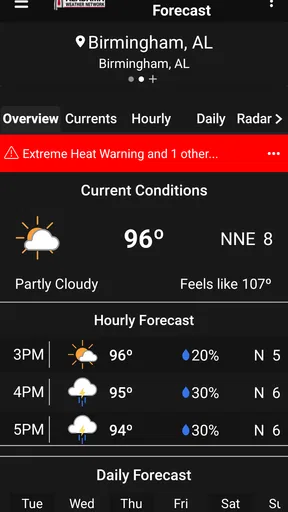
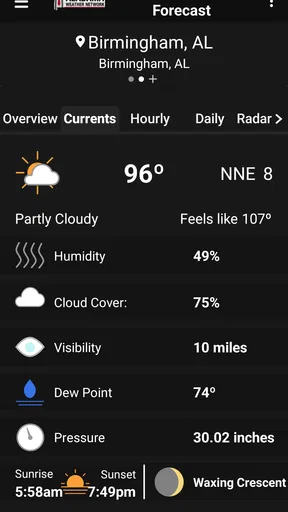
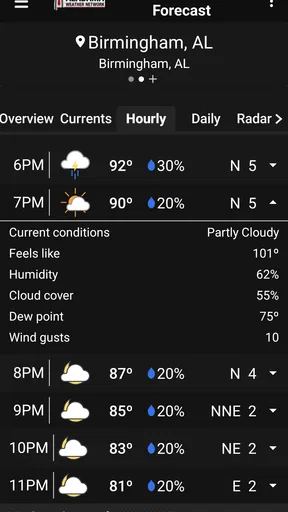
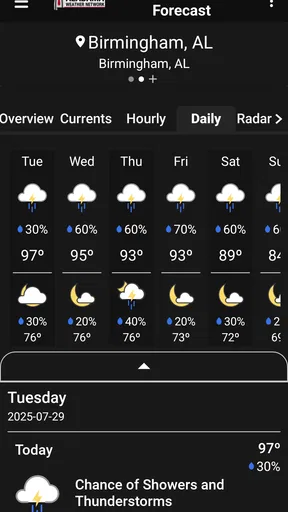
 Analysis by AppCompare
Weather apps are most useful when you need to make a decision, not when you want to stare at a forecast. I look at Alabama Weather Network as a local planning tool: its focus is Alabama weather, with radar, alerts and forecasts presented through the work of Alabama Weather Network, the developer. That focus makes it more relevant to residents and visitors than a broad forecast app when the question is what conditions are doing nearby.
Where a local forecast earns its place
The app is especially appealing if you plan around changing weather: deciding when to leave, whether to move an outdoor chore indoors, or if a drive can wait until a storm passes. James Spann is central to its weather coverage, which gives the experience a distinctly Alabama identity rather than the feel of a generic national forecast. I would treat it as a useful place to check local conditions, while still using judgment for plans that depend on a precise, up-to-the-minute call.
That local emphasis also defines who may prefer another option. If you mainly need forecasts for several states, international destinations or a long trip with many stops, a broader weather service may be easier to use as your everyday default. For an Alabama household, though, a local source can make the routine check feel more pertinent than scrolling through a national app designed to serve everyone at once.
Using it around a busy day
Imagine you are leaving for work while rain threatens later. A quick look at the forecast can help you decide whether to carry a jacket and whether an outdoor errand belongs on the morning schedule. If conditions look unsettled, radar gives you another way to judge what is approaching rather than relying only on a single forecast summary. That is a practical workflow: check the outlook first, then use the map when timing matters.
I would also make the check part of a small routine before a drive or an outdoor gathering. Weather information is most helpful when it changes what you do, so there is little value in repeatedly refreshing a screen when your plans are fixed. For a time-sensitive choice, look again shortly before leaving; for a general plan, an earlier forecast is a useful guide, not a guarantee.
Getting Started with the App
The first thing I noticed was how easy the Alabama Weather Network is to set up. I’m not the most tech-savvy person, but this app made me feel like a pro. As soon as you open it, there's a quick tutorial that walks you through the features. It’s like having a personal weather assistant in your pocket. You can set your location manually or let the app do it for you with GPS. I decided to go the lazy route and let it auto-detect my location, which worked seamlessly.
User Interface and Design
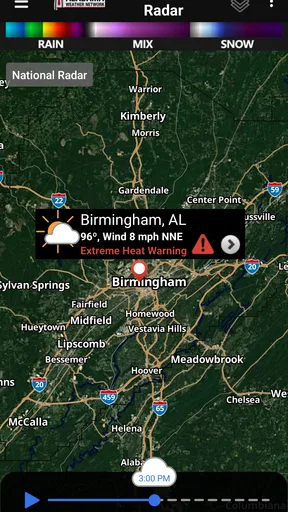
Let’s talk about the design. It’s sleek, modern, and super intuitive. The developers clearly put a lot of thought into making it user-friendly. The dashboard is packed with information but doesn’t feel overwhelming. You get the current temperature, a five-day forecast, and even live radar maps right at your fingertips. Everything is color-coded, which makes it easy to see at a glance if you’re in for sunny skies or stormy weather.
Worth Reading Before You Choose

Flipboard Shows What News Apps Must Do Beyond the Feed

Switching to Android Auto Means Rethinking Your Driving Routine

Google Calendar Makes a Crowded Week Easier to Manage

Ludo King Makes the Most of the Minutes Between Plans

Baby Panda World Brings Quick Play to Modern Phones, but Its Game Library Feels Busy

ESPN’s Live Game View Makes Following Close Games Easier
I also appreciate the customizable alerts. You can set notifications for severe weather conditions like tornadoes or thunderstorms, and the alerts are prompt and accurate. Nothing feels more reassuring than knowing you’ll be the first to know if a storm is brewing.
Making sense of radar and timing
Radar is most useful when I have a specific question: whether rain is moving toward my route, whether an outdoor task has a window before showers, or whether a storm appears to be passing. I find it helpful to use the map as a second view alongside the forecast, rather than trying to infer the whole day from radar alone. A radar snapshot describes what is happening and moving through; it is not a promise about exactly what will happen at my front door.
For a family outing or a long drive, I would check conditions at both the starting point and the destination if those places are in Alabama, then make another check before setting off. The practical trade-off is that more map detail can take longer to interpret than a simple forecast card. If I only need to know whether to bring a coat, a quick forecast glance is enough; if I need to judge timing, the radar is the better tool.
Features that Stand Out
One of the standout features for me is the detailed radar maps. They are incredibly detailed and allow you to zoom in and out to see how weather patterns are moving. It’s like having a mini weather channel in your hand. The maps load quickly and provide real-time updates, which is crucial when you’re trying to decide if it’s safe to head out for that evening jog.
Another feature I love is the daily weather reports. You can choose to receive these at a specific time each day, which is perfect for planning your outfit or deciding if you need to grab your umbrella before heading out. The reports are concise but thorough, covering everything from temperature highs and lows to wind speed and humidity.
Connectivity changes what you can check
Radar and fresh forecasts depend on being able to reach current weather information, so I would check the app while connected before entering a weak-signal stretch or heading somewhere with unreliable reception. That is especially sensible before a rural drive or an outdoor event: review the latest conditions while you have a connection, and do not assume a live map will remain current if the network drops. The app’s strongest use is an active check, not a substitute for planning ahead.
On a phone, the best moment to consult a weather app is often brief: at home before leaving, in a parked car, or while deciding whether to reschedule. I would avoid trying to study a moving radar display while driving. If I am already outdoors and reception is patchy, the responsible choice is to rely on the information I checked earlier and find a safe place with a connection before refreshing or changing plans.
Alerts, attention and data-conscious habits
Alerts can be valuable because they bring a weather change to your attention without requiring you to open the app constantly. I would choose the notifications that matter to my household and make sure the phone itself is set up to show them appropriately. An alert is a prompt to take a closer look and follow sensible safety guidance, not a reason to treat a phone notification as the only source of information during severe conditions.
If you are trying to limit mobile data or battery use, a simple habit is to check the forecast when connected to Wi-Fi and open radar only when its extra detail can affect a decision. Maps and repeated refreshes are more demanding than a quick glance at text or summary information in many apps, so avoiding needless reloads is a practical way to keep phone use purposeful. I would not count on live weather displays to stay current without connectivity; when reception returns, refresh before acting on changing conditions.
What to expect when the connection falters
A network-dependent weather check can be frustrating at exactly the wrong time: just as rain approaches or a trip is about to begin. If a screen does not update, I would first check whether the phone has a working connection, then try again from a place with stronger reception. For an immediate decision, use the most recent information already visible only as a starting point, and avoid treating an old radar image as current.
This makes the app a strong companion for people who usually have dependable mobile service and want local Alabama context at a glance. It is less suited to someone who routinely needs weather updates in places with no reliable connection, or who expects an app to replace a backup plan. Before an important outdoor commitment, checking conditions ahead of time and having a flexible alternative is more sensible than waiting until the last minute to load a map.
Performance and Reliability
If you’re like me, you’ve probably tried a few weather apps that promise the world but deliver little. Thankfully, the Alabama Weather Network isn’t one of them. It’s reliable, fast, and doesn’t crash. I’ve been using it for over a month, and it’s been consistently accurate in its forecasts. Whether I’m checking a week in advance or just a few hours ahead, the app’s predictions have been spot on.
My main qualification is that forecasts are guidance, not certainty, and conditions can shift between checks. For an ordinary choice such as what to wear, a forecast is usually a helpful planning aid; for a weather-sensitive trip or outdoor event, I would revisit it close to departure. If the connection is poor, I would not interpret a delayed display as confirmation that conditions have stayed the same. That small distinction matters more than any polished interface.
Who will get the most from it
I would recommend it first to people who live in Alabama, travel around the state, or have routines shaped by local weather. The free price makes it easy to try, and its Everyone content rating makes clear that it is intended for a general audience. It has a 4.7 average from around 120 ratings, while more than 10,000 installs suggest that it has found an audience beyond a handful of early users. Those figures are useful context, but they cannot tell you whether its local focus fits your own routine.
People comparing weather apps should think about what they actually need. A large national service may suit someone who wants a single tool for frequent travel across regions, while a simple built-in phone forecast may be enough for someone who checks only the temperature. This app makes more sense when Alabama-specific coverage, radar and local alerts are the reason for opening it. If those details are not part of your decisions, a lighter or broader alternative may be more convenient.
Version and day-to-day fit
The current version is 6.7.1.9, and the app is listed for Android devices running version 7.0 or later. That helps Android users judge basic compatibility before installing. It is free, so there is no purchase decision to weigh against trying it; the more important question is whether you want a dedicated Alabama weather source or would rather keep using a general forecast app.
I would make it a useful second opinion if I already relied on another service for national travel, and a primary quick-check option if most of my weather decisions happened within Alabama. Keeping the purpose clear prevents a common frustration: expecting one local app to be the perfect tool for every destination and every connectivity situation. For a local forecast, alerts and radar workflow, its focus is a strength; beyond that, a broader service may deserve a place alongside it.
Final Thoughts
In a nutshell, the Alabama Weather Network app is a must-have for anyone living in or traveling through Alabama. It’s comprehensive, user-friendly, and reliable, making it a top contender in the weather app category. Whether you’re planning a beach day or trying to avoid an unexpected downpour, this app has got you covered. So, if you haven’t already, give it a whirl. It’s free to download, and trust me, you won’t regret it.
So, next time you find yourself wondering if you should pack a raincoat, just check the app. It’s like having a weather expert in your pocket, ready to guide you through Alabama’s ever-changing climate.
Pros
- Accurate local weather forecasts.
- User-friendly interface design.
- Real-time severe weather alerts.
- Customizable notification settings.
- Includes radar and satellite maps.
Cons
- Contains occasional ads.
- Limited offline functionality.
- Requires frequent updates.
- Some features need premium access.
- Battery consumption can be high.
FAQs for Alabama Weather Network
What features does the Alabama Weather Network app offer?
The Alabama Weather Network app provides real-time weather updates, including current conditions, hourly and weekly forecasts, and severe weather alerts. It also features interactive radar maps, customizable notification settings, and detailed weather information for specific locations across Alabama. Users can personalize their experience by selecting preferred cities and regions.
Is the Alabama Weather Network app free to use?
Yes, the Alabama Weather Network app is free to download and use. However, it might offer in-app purchases or premium features that enhance the user experience, such as removing ads or accessing advanced radar tools. It's advisable to check the app store for specific pricing details and options.
How accurate is the weather information provided by the app?
The Alabama Weather Network app sources its data from reliable meteorological services, ensuring high accuracy in weather forecasts and alerts. It uses advanced algorithms and real-time data to provide users with precise weather information. However, as with any weather service, users should be aware that forecasts can occasionally change.
Can I receive severe weather alerts through the app?
Yes, the Alabama Weather Network app provides severe weather alerts to keep users informed about potential dangers such as thunderstorms, tornadoes, and flash floods. Users can customize alert settings based on their location and severity level, ensuring they receive timely notifications about critical weather updates.
Does the app require an internet connection to function?
The Alabama Weather Network app requires an internet connection to access real-time weather data and updates. While some features like saved forecasts might be available offline, a stable internet connection ensures the most accurate and up-to-date information. Users should ensure connectivity for optimal app performance.


